Every GPS session your squad runs, in one clear picture.
LoadTrack turns the training and match data you already record into per-player KPIs, like distance, high-speed running, sprint and acceleration trends, readable in seconds. Connect live via a GPS provider's API, or import CSV exports instead.
The demo opens instantly with sample data, no signup required. Creating an account takes a minute and gives you a working dashboard right away.
The data is already there. The overview usually isn't.
Most clubs record far more than they ever get to use. LoadTrack closes that gap.
Data lives in exports, not in decisions
Sessions land in one dashboard per club, per player, per week. No more digging through folders of exports before a staff meeting.
Manual spreadsheet work eats the day
Totals, high-speed running, sprint distance, player load and accelerations are calculated automatically when a session arrives.
Trends over weeks are hard to see
Week and date ranges, seasons, per-session charts and a weekly load heatmap reveal spikes and drop-offs at a glance.
Real insights from within the app
Everything below is captured from the live demo. These are the same views your staff would work in.
Every staff member can shape the view to fit their workflow. Unlock the padlock in the Dashboard or Session/Match Breakdown to freely add, remove, and reorder stat cards, columns, and charts. The layout is yours to decide.
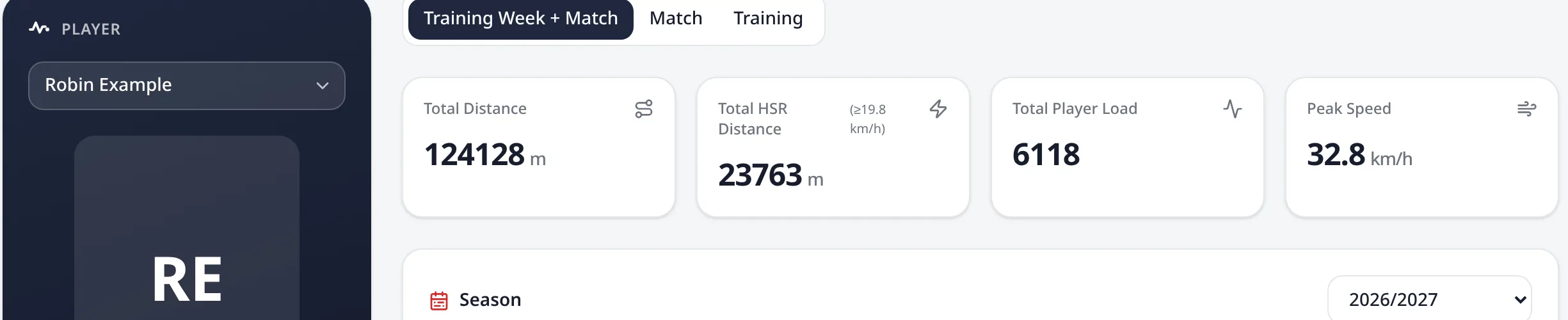
Pick a player, pick a range
Match, Training or the full training week + match view. Stat cards recalculate for the selected weeks or exact dates, and each tab can show its own set of metrics.
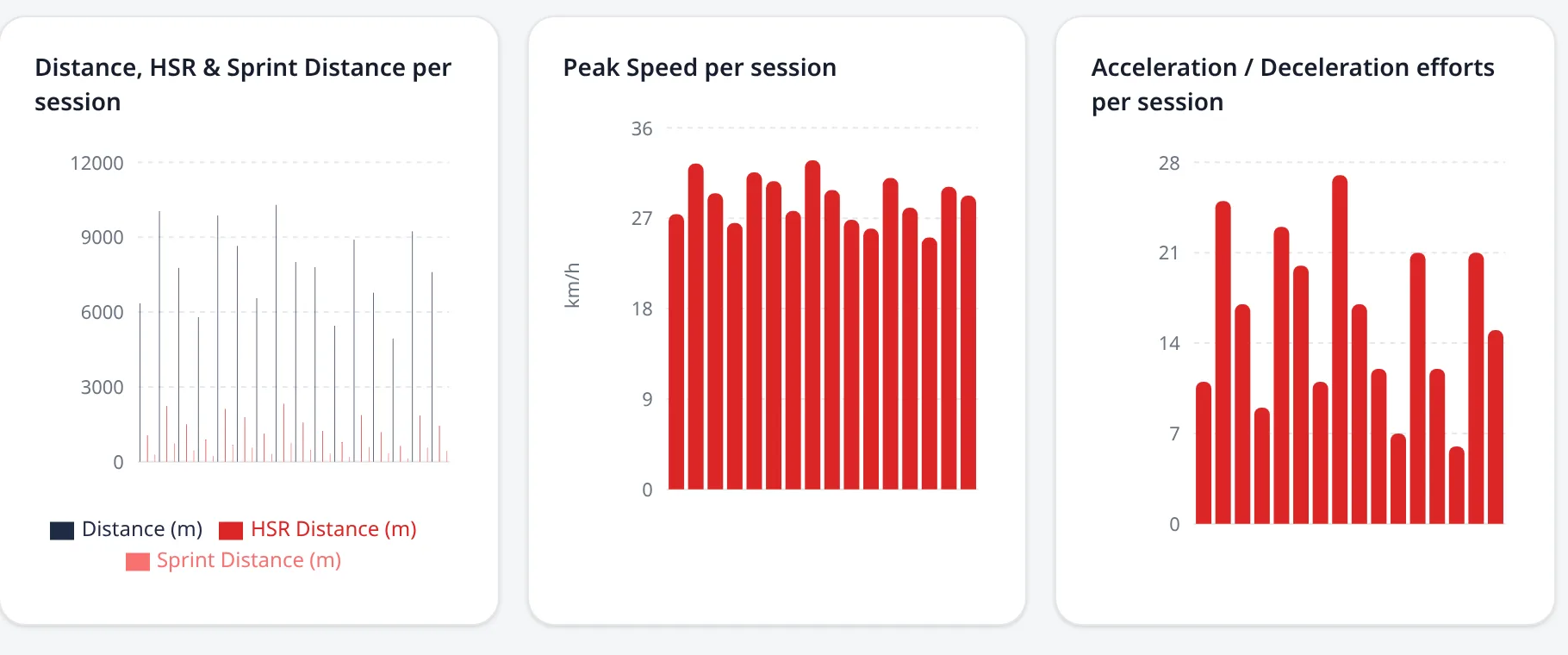
Session-by-session charts
Distance, HSR and sprint distance side by side, plus maximum velocity and accel/decel efforts. One bar per session makes a hard week impossible to miss.
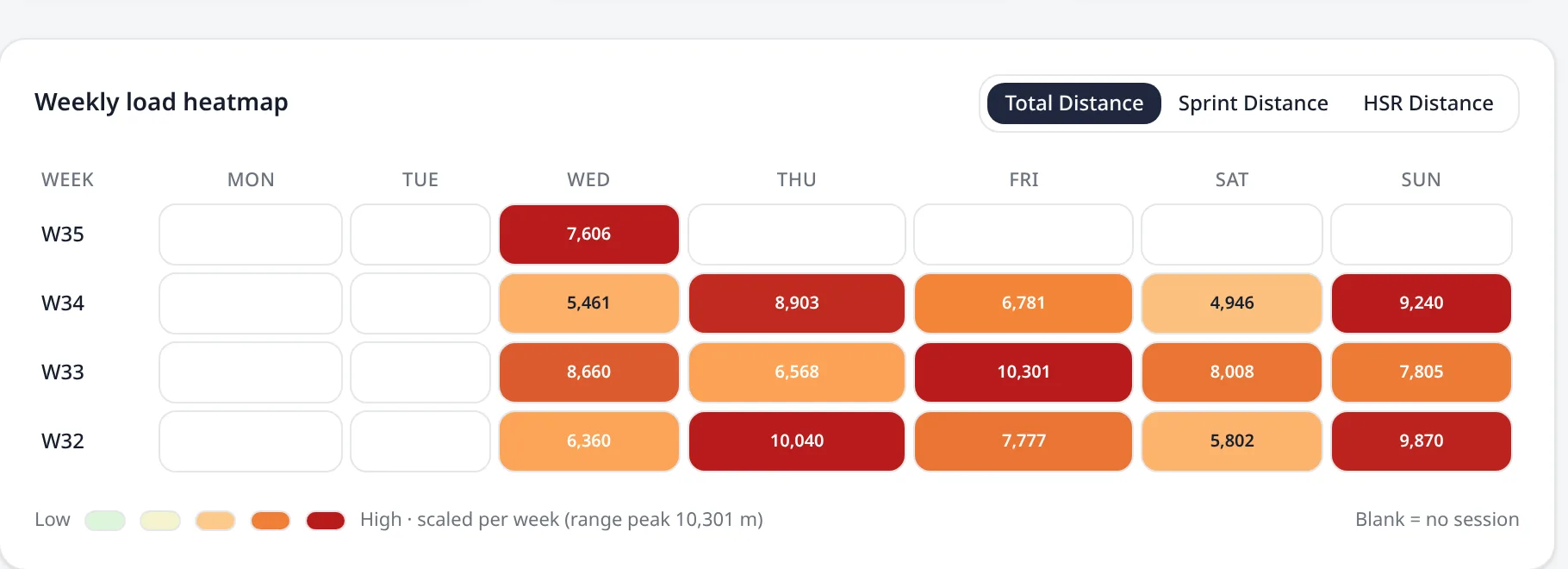
Weekly load heatmap
One row per week, one cell per day, colour-scaled inside each week so the shape of the week reads instantly. Switch between KPIs such as total, sprint and HSR distance.
Two ways in. Same analytics.
Your GPS setup decides how data reaches LoadTrack. It does not decide what you get out of it.
Live provider connection
If your GPS provider offers an API, Catapult is one example. Connect it once in Settings. Sessions, athletes and match periods are pulled in automatically and cached. The dashboard stays fast.
CSV import
No API? Drop one or many session exports onto the CSV Import Analysis tab. Label them as match or training. You get the same period breakdown tables, squad comparisons and printable reports.
Imported files stay completely separate from live provider data. A CSV upload never overwrites or affects a player's live session history. It only powers its own dedicated breakdown view and printable report
Squad data handled with care
One workspace per club
Every player, session and setting belongs to a club. Staff only ever see the club they were invited to. That rule is enforced in the database, not just in the interface.
Credentials stay server-side
Provider API keys are stored encrypted and only used by the backend. They are never exposed to the browser or to other clubs.
Access you control
Invite staff by email. Transfer ownership. Remove a member's access without touching their account or your data.
See it with sample data first
The demo is the whole dashboard, read-only and with no account required. When it fits your club, create an account and get started.